Gab AI Work
Choose Auto or a supported main model.
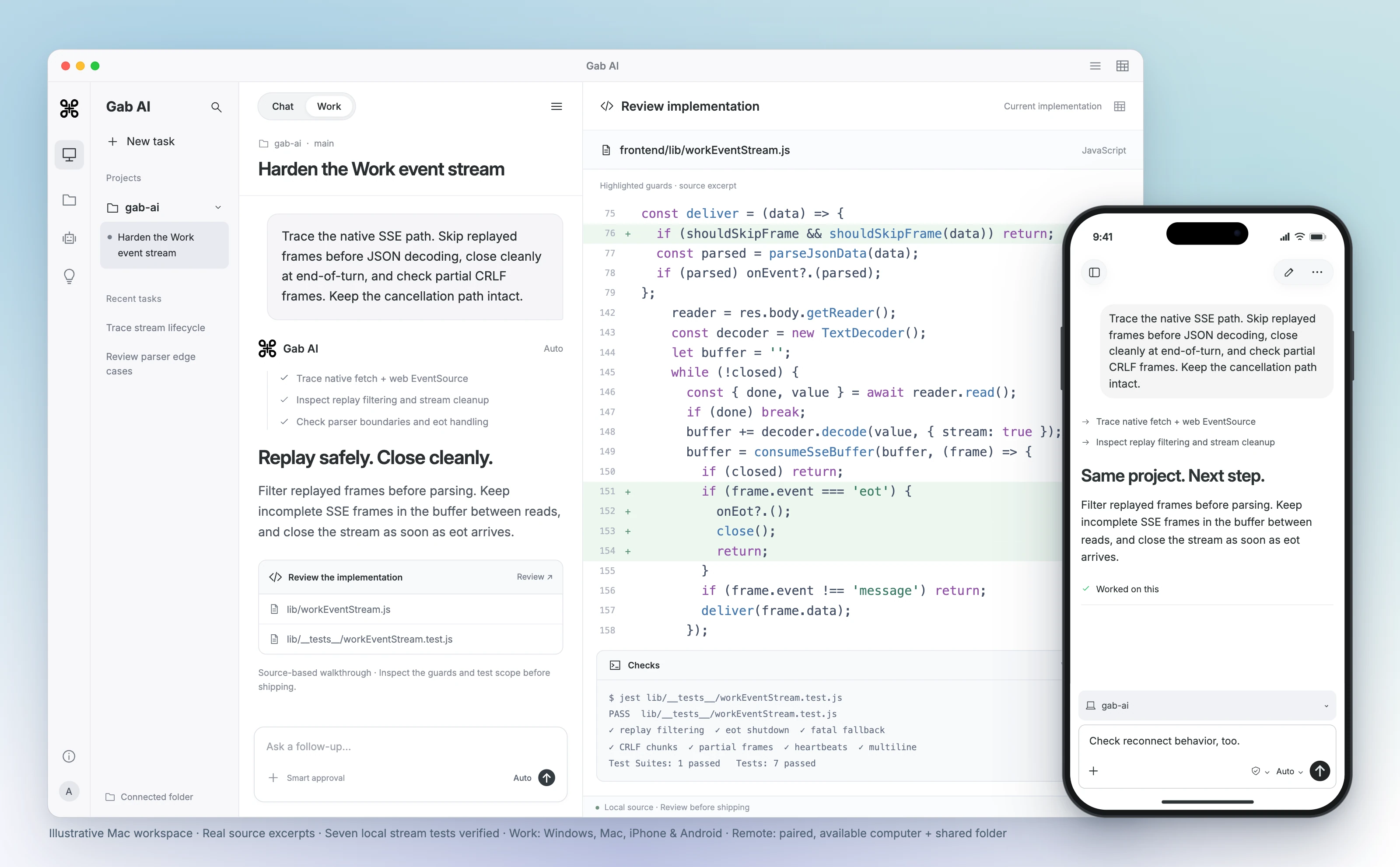
Ask for an editable document, spreadsheet, presentation or code project. Follow the task, review its files and request a focused revision in the same conversation.
Compare AI workspaces
Write, research and build projects with Arya and models from several providers in Gab AI. Compare that choice with ChatGPT’s Chat, Work and Codex workflows, and bring supported conversation history when you switch.
Free to try with signup credits. See Pricing for plans and model access.
Use GPT, Claude, Gemini, Arya and more in one Gab AI account.
View modelsSend one prompt to several models, read their answers side by side and choose a direction.
See workspace examplesChoose Gab’s own model for uncensored chat with a conservative perspective.
Meet AryaCompare requires Plus. Model access and credit usage vary.
Keep ChatGPT when its workflows, existing context and available tools suit your task. Consider Gab when you want Arya or supported provider choices beside its Chat, Work and media tools.
Write with Arya, switch models for another perspective and keep refining the same conversation.
See model choicesSave instructions and memories for recurring tasks, with separate controls for what is learned and used.
Review memory controlsImport supported ChatGPT history, inspect the messages and continue with your own instructions.
Read the import guideChatGPT Work vs Gab AI Work
Give Work the brief, bring your sources and keep refining the result. Both services can turn a task into files you can review; Gab puts supported Work model choices beside your chats and creative tools.
Choose Auto or a supported main model.
Ask for an editable document, spreadsheet, presentation or code project. Follow the task, review its files and request a focused revision in the same conversation.
Delegate a task through ChatGPT.
ChatGPT Work can use files, plugins and approved tools to research, create finished files and run workflows. OpenAI documents cloud work and supported desktop access to local files, apps and the browser.
Gab Work requires Plus and uses credits. Available models and tools depend on the service, plan and platform.
Gab AI apps and Codex
Use Gab AI for chat, creative tools and Work across desktop and mobile. For shared computer projects, pair your phone through Remote and choose the folders it can access.
One account. More ways to keep working.
Keep your models, conversations and credits in one account. Chat with Arya or another available model, use cloud Work, or connect a supported desktop project and continue from your phone with Remote.
Developer tools, plus broader project work.
Codex supports repositories, commands, tests and code review, alongside research, documents and other knowledge work. OpenAI also documents local file, browser and app tools and lists mobile remote control. Availability depends on plan, platform and rollout.
Review code on your computer, then continue the shared project from your iPhone or Android phone. Remote supports Windows and compatible direct-download Mac apps. Keep the paired computer awake, online and Gab AI running.
Continue the same task from your computer or phone.
Arya by Gab AI
Discuss politics, culture and faith with Gab’s own model. Arya gives you a stated perspective alongside the other models you can choose in Gab AI.
Develop an argument, examine an objection or write in your own voice. Ask about a supplied Scripture passage, prepare a Bible study or shape a devotional with Arya’s Christian worldview.
Keep exploring in the same conversation, or choose another available model when you want a different approach. Review important factual claims and sources, whichever model you choose.
Switch from ChatGPT to Gab AI
Import supported ChatGPT text history into your Gab AI account, then choose an available model for your next message. Start with the complete export and keep your original copy.
Use ChatGPT’s data-export controls and download the complete archive. Keep an original copy.
In Gab AI, open Settings → Import, choose ChatGPT and select the ZIP or supported conversation JSON files.
Review imported, skipped and error counts, check a representative conversation, then choose an available model for your next message.
Memories, settings, credentials and original file contents are separate from supported text-history imports. Set up the context you want before continuing.
Compare the workflow, model choice and account setup that matter to you.
| Decision | Gab AI | ChatGPT |
|---|---|---|
| Workflow | Chat for a draft; Plus Work for multi-step tasks and files. | Official guidance describes Chat, ChatGPT Work and Codex; available tools and usage depend on plan. |
| Model selection | Arya and supported provider models, subject to access. | ChatGPT model access follows its current plan and rollout; this is not a single-model-only service. |
| Personalization | Manual memory plus separate Plus learning and scope controls. | Official memory guidance distinguishes ChatGPT account/workspace settings from local Codex memory. |
| Website pricing | Website Plus: $20.00 monthly or $200.00 annually; 2,000 monthly credits. Model/tool costs and limits apply. | Official pricing lists Free and paid ChatGPT plans, including Plus at $20/month; API-key usage is separate. |
| Data and migration | Supported ChatGPT text history can be imported; memories and other settings need separate setup. Gab sends relevant task context to selected providers; see the privacy guide. | Review the current ChatGPT account/workspace controls and export scope before moving data. |
Yes. Gab AI is free to start without a credit card. A new account receives 250 signup credits after email verification for eligible requests, including Arya and selected text and image models. Plus adds Work, live Voice, monthly credits and included default Arya chat in the app. See Pricing for model access and service limits.
It depends on the work you want to do. ChatGPT may already suit your tasks and existing projects. Gab AI brings GPT, Claude, Gemini, Arya and more into one account, with Compare for reading several models’ answers side by side and Decks for keeping separate conversations together. You can also create images and video with eligible models. Choose the workflow and model access that fit your task.
Yes. Available GPT models appear alongside Claude, Gemini, Arya and other models in Gab AI’s picker. Check the model library for current choices and access. Using a GPT model in Gab AI gives you Gab’s tools and workflow; it does not reproduce every feature or setting of the ChatGPT app.
You can export your ChatGPT data and import supported text conversations into Gab AI. Supported Claude, Grok and Gab exports can also be imported. Keep the original export, select the matching provider, review imported, skipped and failed records, and open a representative conversation to check it. Memory, settings, credentials and original file contents have separate scopes and are not automatically transferred with text history.
Gab AI includes Arya, Gab’s own model for uncensored chat with a conservative perspective, alongside clearly labeled third-party models such as GPT, Claude and Gemini. Its Chat, Work, Compare, Deck and creative tools bring those choices into a Gab AI workspace. A third-party model is identified as that provider’s model.
Yes. Gab AI has apps for Windows, Mac, iPhone, iPad and Android, plus access through a web browser. Sign in with the same Gab AI account to continue your cloud conversations and use your account’s credits across supported devices. Check the download page for current apps and requirements; available features can vary by platform.
No identical-answer or better-quality guarantee follows from a provider name. Context, exact model/version, tools and instructions differ. Compare the same task and check the result.
Find more detail and choose your next step.
Creative outputs and model access: bot rate cards, compute points, Gab credits and API conditions.
Read comparisonReading and browser work: selected text, permitted page context, extension access and paid tools.
Read comparisonThe AI product at chathub.gg: parallel answers, model access, keys and task review.
Read comparisonPersonal BYOK interface versus Gab account access: license, API charges, storage and portability.
Read comparisonRepeated Chat tasks: context, usage reservations, allowance resets and current model access.
Read comparisonIdentity verified: Galaxy.ai links to Magica. Compare a task workflow, not Samsung phone features.
Read comparisonAPI gateway and Chat: endpoint compatibility, provider routing, keys, policies and task cost.
Read comparisonCreate your account, bring a useful question or source, and shape the result in conversation.